

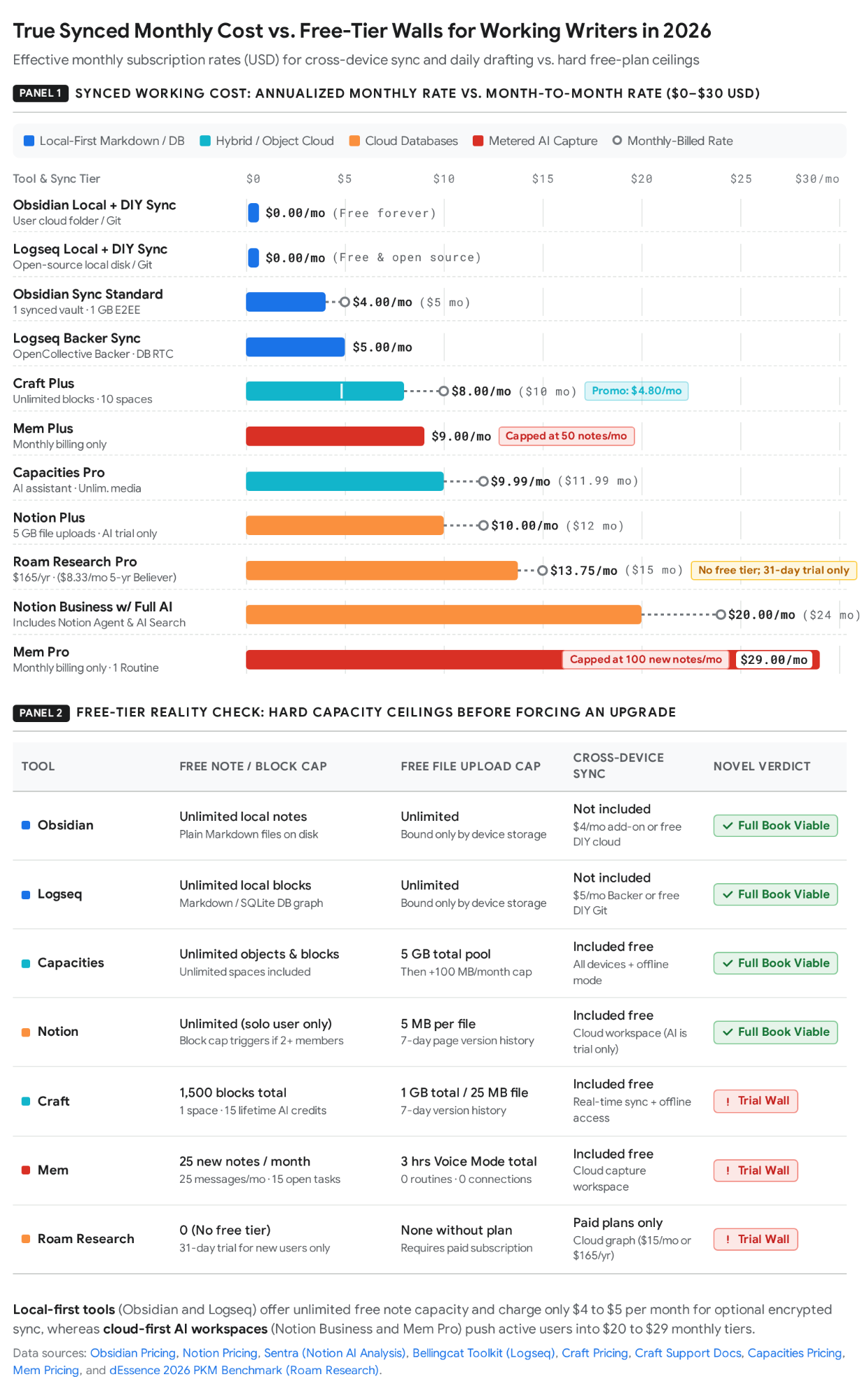
| Tool | Free Tier Allowances & Hard Limits | Paid Entry Price (Monthly & Annual) | Storage Model | Linking Model | Best For (Writer Profile) | Who Should Not Use It (Abandonment Profile) | Price Verification Date & Source URL |
|---|---|---|---|---|---|---|---|
| Obsidian | $0 forever, unlimited notes, blocks, local vaults, and plugins; no sign-up required; commercial use is also free/optional since Feb 2025[1]. | Core App: $0. Sync Standard: $5/mo monthly or $4/mobilledannually($48/yr; 1 vault, 1 GB). Sync Plus: $10/mo monthly or $8/mo annually($96/yr; 10 vaults, 10 GB). Publish: $10/mo monthly or $8/mo annually[1]. | Local files: Plain text Markdown (.md) files stored in local folders on disk; optional AES-256 E2EE Sync or DIY cloud/Git sync[1]. | Wikilinks & backlinks: Bidirectional [[wikilinks]], contextual backlinks, unlinked mentions, aliases, YAML properties, Obsidian Bases, Dataview queries, and Graph View[5]. | Solo novelists, multi-book series authors, and long-form nonfiction writers who want local file ownership and custom scene compilation[3]. | Writers who want turnkey novel structure out of the box or who procrastinate by endlessly tweaking CSS snippets and plugins[4]. | Checked Oct 8, 2026 ([1] & [89])[1]. |
| Notion | $0/member/mo: Unlimited blocks for 1 solo member (becomes block-limited if 2+ members join); 5 MB max file upload, 10 guests max, 7-day page history, limited Notion AI trial[9]. | Plus: $12/member/mo monthly or $10/member/mobilledannually($120/yr; €9.50/mo EUR). Business (bundles full Notion AI): $24/member/mo monthly or $20/member/mo annually($240/yr; €19.50/mo EUR). Custom Agents: $10 per 1,000 credits (from May 4, 2026)[3]. | Cloud database: Proprietary block database on Notion servers; selectable offline pages; search and speed degrade past a few thousand pages[2]. | Relational databases: Multi-table relations, rollups, custom properties, filtered views, @ mentions, and basic page-level backlinks (no inline context or unlinked mentions)[2]. | Author-entrepreneurs managing editorial calendars, marketing pipelines, ARC teams, co-authors, or structured tag-filtered scene matrices[2]. | Solo prose drafters who need fast offline typing, local file ownership, contextual backlinks, or manuscripts exceeding 50,000+ words in one view[2]. | Checked Nov 13, 2026 ([9])[9]. |
| Logseq | $0 forever (AGPL-3.0 open source): Unlimited local graphs, blocks, pages, built-in PDF annotation, flashcards, queries, and whiteboards[4]. | Core App: $0. Logseq Sync / DB RTC (OpenCollective Backer): $5/mo or $60/yr billed annually (€5/mo EUR). Sponsor Tier: $15/mo (€15/mo EUR) for insider builds[15]. | Local files / Local DB: Mid-split in 2026: Logseq OG (v0.10.15) uses local Markdown/Org files; Logseq 2.0 beta (v2.0.2) uses a local SQLite database graph[2]. | Block references: Every bullet is a UUID node; supports ((block-id)) references, block transclusion, bidirectional [[links]], properties, and Datalog queries on Daily Notes[2]. | Academic nonfiction writers, researchers annotating PDFs, and daily journalers who think in hierarchical bullet trees and atomic fragments[4]. | Long-form prose drafters and novelists—the mandatory bullet-per-paragraph outliner fights continuous narrative flow and lacks mobile polish[4]. | Checked Oct 29, 2026 ([14])[3]. |
| Roam Research | No free tier ($0 plan does not exist). Offers a 31-day free trial valid only if you have never held a plan[3]. | Pro: $15/mo billed monthly or $13.75/mobilledannually($165/yr). Believer: $500upfrontfor5years($8.33/mo equivalent)[3]. | Cloud database: Proprietary cloud-hosted graph database on Roam servers (optional encrypted graphs; partial desktop offline cache; JSON/MD export)[3]. | Block references & transclusion: Bidirectional [[links]], block-level ((references)), inline block embeds, boolean queries, and shift-click sidebar stacks[3]. | Nonfiction essayists and researchers deeply wedded to Roam's native block transclusion and sidebar ergonomics who do not mind paying a premium[22]. | Budget-conscious writers, offline-first novelists, and mobile capture users—Obsidian and Logseq replicate its graph model for $0 locally[16]. | Checked Oct 8, 2026 ([21])[3]. |
| Craft | Starter ($0): Capped at 1,500 blocks total, 1 personal space, 1 GB storage, 25 MB max file upload, 7-day history, and 15 lifetime AI credits (never refreshes; Apple on-device AI is free)[24]. | Plus: $10/mo monthly or $8/mobilledannually($96/yr; regional/promo pricing displays $4.80/mo or €4.80/mo). Family: $18/mo or $180/yr ($9/mo promo; up to 6 users). Team: $6/user/mo or $60/user/yr ($5/user/mo promo)[24]. | Hybrid (Cloud JSON + Optional Local): AWS cloud storage (encrypted at rest, not E2EE) with offline Apple apps; optional local/iCloud External Locations (disables sharing/collab)[27]. | Document & block links: @ page/block links, nested sub-page cards, basic bottom-of-page backlinks, hierarchical inline tags, and semantic Smart Search[24]. | Apple-first essayists, freelance writers, and client-facing authors who prioritize polished typography, visual cards, and 1-click web/PDF sharing[28]. | Deep worldbuilders and Zettelkasten users who need unlinked mention tracking, dynamic metadata queries, or plain-text local Markdown storage[27]. | Checked Nov 12, 2026 ([24] & [25])[24]. |
| Capacities | Basic ($0 forever): Unlimited spaces, objects, blocks, and custom object types, cross-device cloud sync, offline mode, and 5 GB total media storage (+100 MB/mo after); no AI[3]. | Pro: $11.99/mo monthly or $9.99/mobilledannually($119.88/yr; €10.99/mo or €8.99/mo EUR). Believer: $14.99/mo monthly or $12.49/mo annually($149.88/yr). Plus AI Add-on: +$8.33/mobilledannually($99.96/yr)[3]. | Cloud database with offline cache: Cloud-synced object database across desktop, web, and mobile with local offline access and full Markdown/JSON export[3]. | Typed Object Graph: Notes are typed objects (Person, Book, Page, Location) with fixed schemas, multi-category Tags, @ object links, backlinks, and Shift-click side panels[2]. | Nonfiction researchers and worldbuilders who want structured object databases (books, characters, sources) and built-in sync without configuring plugins[2]. | Linear manuscript drafters—Capacities has no scene compiler or novel-export pipeline, and rigid up-front object schemas slow down discovery writers[18]. | Checked Oct 23, 2026 ([33])[3]. |
| Mem | Mem Free ($0): Capped at 25 new notes/mo, 25 messages to Mem/mo, task tracking on 25 notes (15 open tasks max), 3 hrs Voice Mode, and 0 Custom Routines or Connections[37]. | Mem Plus: $9/mo monthly (50 notes/mo, 50 msgs/mo). Mem Pro: $29/mo monthly (100 notes/mo, 100 msgs/mo, 25 hrs voice). Pro 2× / 5× / 10× / 20×: $49 / $99 / $149 / $199/mo. Annual billing: None listed[37]. | Cloud database: Folderless cloud workspace with offline sync on Mac, Windows, iOS, and Web; no Android app available[38]. | AI-first contextual linking: Zero-folder Collections, automatic AI-generated links, semantic Deep Search, real-time Heads Up context panel, and Mem Chat / Mem Agent[37]. | Fast-moving nonfiction columnists, journalists, and voice-note ideators who dump raw interviews/emails and retrieve via conversational AI[37]. | Novelists and high-volume researchers—paying $29/mo while still being metered at 100 new notes/month breaks scene-by-scene fiction workflows[37]. | Checked Nov 2026 ([37]; Feb 10, 2026 legacy $12/mo noted at [39])[37]. |
Scroll sideways to see all columns →
1. Tool Profiles: Pricing, Architecture, and Writer Fit
Obsidian
Verdict: Obsidian is the strongest knowledge base and drafting environment for solo novelists and long-form nonfiction writers who want permanent local file ownership, contextual backlinks, and zero mandatory subscription costs ([1], checked October 8, 2026)[1]. You should not use Obsidian if you want pre-built novel templates out of the box, require real-time multiplayer editing with co-authors, or lack the discipline to stop configuring community plugins and start typing prose[4].
Obsidian's free tier is $0 forever without functional limits, requiring no account sign-up and collecting zero telemetry ([1], checked October 8, 2026)[1]. It grants unlimited local vaults, unlimited notes, full access to over 2,000 community plugins and 200+ themes, Canvas spatial boards, spreadsheet-like Obsidian Bases, and Graph View[1]. Since February 2025, commercial use is also free, making the $50 USD/user/year Commercial license strictly optional ([1], checked October 8, 2026)[1]. Paid add-ons are modular: Obsidian Sync Standard costs $4USD/user/monthbilledannually($48/year) or $5 USD/user/month billed monthly for 1 synced vault, 1 GB storage, a 5 MB maximum file size, and 1-month version history ([1] and [89], checked October 8, 2026)[1]. Obsidian Sync Plus costs $8USD/user/monthbilledannually($96/year) or $10 USD/user/month billed monthly for 10 synced vaults, 10 GB storage (upgradable to 100 GB), a 200 MB maximum file size, and 12-month version history ([89], checked 2026)[1]. Obsidian Publish costs $8 USD/site/month billed annually or $10 USD/site/month billed monthly, and a one-time Catalyst license costs $25 USD for beta access ([1], checked October 8, 2026)[1].
Under the hood, Obsidian uses a local-first storage model where every note is a plain text Markdown (.md) file sitting in a standard folder on your hard drive, ensuring your manuscripts outlive the software ([3], October 8, 2026)[1]. Users can sync across Mac, Windows, Linux, iOS, and Android using optional AES-256 end-to-end encrypted Obsidian Sync or free DIY alternatives like Dropbox, iCloud Drive, Git, or Syncthing[1]. Its linking model pairs bidirectional [[wikilinks]] and YAML frontmatter properties (aliases, pov, status) with a Backlinks Panel that displays the exact surrounding paragraph context of every reference, plus an automatic Unlinked Mentions detector that catches character or setting names you forgot to bracket ([6])[6]. For writers, Obsidian excels at maintaining zero-lag performance across 10,000+ notes, viewing reference lore side-by-side with manuscript scenes, and compiling granular scene files into a single manuscript via community plugins like Longform, Storyline, Novelr, or Escrita[4]. Conversely, it is bad at turnkey onboarding and multiplayer editing: vanilla Obsidian has no native scene compiler, requires CSS snippets or plugins (Simple Indent, Novelists Assistant) for first-line paragraph indents, and forces a steep setup curve ([5], July 30, 2026)[5]. It is best for solo novelists writing multi-POV or multi-book series, sci-fi/fantasy worldbuilders, and nonfiction authors synthesizing large research archives[6].
Notion
Verdict: Notion is the premier workspace for the business, editorial planning, and collaborative side of authorship—managing publication calendars, ARC teams, and tag-filtered scene matrices—but a flawed environment for drafting a long-form manuscript ([2] and [7], October 4, 2026)[2]. You should not use Notion if you require reliable offline access on the go, want local file ownership of your drafts, or depend on contextual backlinks and unlinked mentions to track narrative continuity[2].
Notion's Free Plan ($0/member/month or €0/member/month at [9], checked November 13, 2026) grants unlimited pages and blocks for a single solo user, up to 10 external guests, a 7-day page version history, and a 5 MB per-file upload limit, alongside a limited trial of Notion AI[9]. Two traps catch writers on the Free tier: embedding screenshots or PDFs quickly hits the 5 MB file ceiling, and adding a second workspace member immediately switches the workspace to a limited block allowance ([10], updated October 13, 2026)[9]. Upgrading to the Plus Plan costs $10USD/member/monthbilledannually($120/year) or $12 USD/member/month billed monthly (€9.50/member/month in EUR; free for 1 member with a student/educator email at [9], checked November 13, 2026), unlocking unlimited collaborative blocks, 5 GB file uploads, and 30-day history, but still restricting Notion AI to a trial[9]. In May 2025, Notion retired its standalone $10 AI add-on ([51], October 27, 2026)[10]; full Notion AI (Notion Agent, Ask Notion, AI Meeting Notes, Enterprise Search beta, and 1,500 Standard + 500 Select monthly credits per seat) now requires the Business Plan at $20USD/member/monthbilledannually($240/year) or $24 USD/member/month billed monthly (€19.50/member/month in EUR; 90-day page history at [9], checked November 13, 2026)[9]. Autonomous Custom Agents (charged starting May 4, 2026 on Business and Enterprise) cost an extra $10 per 1,000 Notion credits after a free trial ([11], November 13, 2026)[9].
Notion operates on a proprietary cloud-native block database hosted on Notion's servers, with manual page downloads (plus auto-downloaded Recents and Favorites on paid tiers) for offline access and workspace backups via HTML, Markdown, and CSV export ([9])[2]. Its linking model centers on relational databases, rollups, and custom property tags that let novelists link a master Scene Database to separate databases for Characters, Locations, Flora/Fauna, and Plot Discoveries ([13], March 15, 2026)[13]. For writers, Notion is genuinely good at visual database filtering—grouping scenes into flexible phases (Beginning – Middle, End) behind hidden tags to trace emotional beats or plot threads during revision, or sharing workspace rows with editors and beta readers[9]. However, Notion is bad at long-form prose drafting and deep textual cross-referencing: searchability and editor speed degrade once a workspace exceeds a few thousand pages ([3], October 8, 2026)[3], and Notion's page-level backlinks only display a list of page titles without showing the surrounding sentence context or catching unlinked mentions ([7], October 4, 2026)[7]. It is best for author-entrepreneurs, collaborative content teams, and visual plotters who draft their actual prose in a dedicated word processor[2].
Logseq
Verdict: Logseq is a free, open-source local block outliner that excels at frictionless daily capture, academic PDF annotation, and atomic query retrieval, but actively fights anyone trying to write continuous long-form narrative prose ([90], March 2026 and [20], 2026)[4]. You should not use Logseq if you think in multi-paragraph documents rather than bulleted trees, need a polished mobile app, or want to avoid software currently split between a legacy file version and a beta database rewrite[2].
Logseq's core application is $0 forever under the AGPL-3.0 open-source license, with zero feature paywalls—giving every user unlimited local graphs, unlimited blocks, built-in PDF annotation, spaced-repetition flashcards, whiteboards, and Datalog queries ([14], checked October 29, 2026)[4]. Optional end-to-end encrypted Logseq Sync and DB-graph real-time collaboration (RTC) are provided to active monthly OpenCollective supporters starting at the Backer tier of $5 USD/month or $60 USD/year billed annually (€5/month in EUR), with a Sponsor tier at $15 USD/month (€15/month in EUR) for insider builds ([17], checked October 29, 2026 and [15])[15]. (Note: One third-party comparison site lists $2.67/month for sync ([91])[53], whereas October 2026 documentation confirms the $5/month OpenCollective Backer rate and notes that standalone commercial sync pricing for the 2.0 DB version remains unannounced ([16], October 2026)[16]).
In 2026, Logseq's local-first storage model is mid-split ([2] and [16], October 2026)[2]: Logseq OG (classic version 0.10.15, December 2025, and current mobile store apps) stores notes as local Markdown and Org-mode files on disk, while the rebuilt Logseq 2.0 DB (desktop version 2.0.2 beta, October 7, 2026) uses a local SQLite database graph[2]. Its linking model is strictly block-centric: every line is an indented bullet ("block") with a unique ID that supports ((block-id)) references, inline transclusion, bidirectional [[page links]], block properties, and boolean/Datalog queries ({{query (and (page "project-x") (property status done))}}) anchored to a default Daily Journal ([19])[4]. For a writer, Logseq is unmatched at zero-friction daily capture—opening directly to today's journal so you never have to ask "what folder does this idea go in?"—and extracting linked highlights from academic PDFs[4]. It is bad at long-form prose drafting (the mandatory bullet-per-paragraph structure constrains narrative flow), lags behind Obsidian on vaults exceeding 8,000–10,000+ notes, and suffers from mobile sync friction ([20] and [19])[4]. It is best for nonfiction researchers, academic writers, and outline-first thinkers who want a free local replacement for Roam Research[2].
Roam Research
Verdict: Roam Research pioneered the modern networked-thought toolkit (daily notes, bidirectional backlinks, and block transclusion), and its sidebar block ergonomics remain deep, but at $15/month ($165/year) with no free tier, cloud-only storage, and slowed feature development, most writers in 2026 are better served by Obsidian or Logseq ([23] and [16], October 2026)[16]. You should not use Roam Research if you want local file ownership, need a free tier, work heavily on mobile, or draft continuous long-form fiction[16].
Roam has no free tier ($0 plan does not exist); it offers a 31-day free trial valid only if you have never held a plan ([21], checked October 8, 2026)[3]. Paid entry starts with the Pro Plan at $15 USD/month billed monthly or $165USD/yearbilledannually($13.75/month equivalent), which includes unlimited private and public Roam graphs, unlimited collaborators, API access, and 90-day version history ([21], checked October 8, 2026, and [22])[3]. A Believer Plan costs $500USDupfrontfor5years($8.33/month equivalent) and adds priority support and community calls ([21], checked October 8, 2026)[3].
Roam's storage model is a proprietary cloud-hosted graph database on Roam's servers, offering optional end-to-end encrypted graphs, brief offline tolerance on the desktop app (mobile requires connectivity), and full exports to Markdown, JSON, and EDN ([16], October 2026)[3]. Its linking model treats every bulleted block as a database node with bidirectional [[page links]], granular ((block references)), live inline block embeds/transclusions, boolean queries, and a shift-click multi-pane right sidebar[3]. For a writer, Roam is genuinely good at nonfiction synthesis—pulling individual quotes, premises, or scene beats from months of Daily Notes into a side-by-side outline while tracking exactly where each block is transcluded across a project[16]. It is bad at long-form prose drafting, mobile capture, local file ownership, and cost efficiency, with recent development focused mostly on backend work rather than new writer features ([16], October 2026)[16]. It is best for established nonfiction essayists and collaborative research groups already deeply invested in Roam's block-query workflow[16].
Craft
Verdict: Craft is an Apple-first document and card studio built for polished visual output, client-ready sharing, and serene writing ergonomics rather than deep networked knowledge management ([32] and [28], 2026)[28]. You should not use Craft if you are building a large interconnected series bible, need unlinked mention discovery or metadata queries, want plain local Markdown storage across devices, or work primarily on Linux or Android[27].
Craft's Starter (Free) Plan ($0 / €0 at [24] and [25], checked November 12, 2026) is capped at 1,500 content blocks total, 1 personal space (0 shared spaces), 1 GB total storage, a 25 MB per-file media upload limit, 7-day version history, a maximum of 2 saved templates and 1 saved style, and a one-time lifetime quota of 15 AI credits (~15–25 AI sessions) that never refreshes ([26], checked November 12, 2026)[24]. Because every paragraph, header, or list item counts as a block, a novelist will hit the 1,500-block free wall after roughly two to three chapters[9]. On-device AI models on Mac, iPad, and iPhone are always free and unlimited[26], and verified students and educators receive a free Education Plan (unlimited documents across 5 spaces, 50 GB/space, 30-day history, 15 lifetime AI credits at [25], checked November 12, 2026)[25]. Paid entry on the Plus Plan costs $10 USD/month billed monthly or $96USD/yearbilledannually($8/month equivalent) per official help center documentation ([25], checked November 12, 2026)[25], while Craft's promotional web pricing page ([24], checked 2026) displays $4.80/month (€4.80/month) discounted from $8.00/month (€8.00/month)[24]. Plus unlocks unlimited blocks (up to 300,000 blocks per space on Mac/iOS before sync limits require moving content to another space), 10 personal spaces, 1 TB storage per space, 5 GB file uploads, 30-day history, and 50 AI credits/month (~250–500 sessions/year)[24]. The Family Plan costs $18 USD/month or $180USD/year ($9.00/€9.00/month web promo) for up to 6 members, and the Team Plan costs $6 USD/member/month or $60USD/member/year ($5/user/month web promo, minimum 3 members) ([24] and [25], checked November 12, 2026)[24]. (Note: Third-party comparisons also reference a legacy Pro tier at $79 one-time or $2.99/month / $29.99/year ([58], November 4, 2026; [57])[25]).
Craft uses a hybrid cloud-first storage model: documents live on Amazon Web Services (AWS) encrypted in transit and at rest (not end-to-end encrypted) with full offline caching on Mac, iPad, and iPhone, and underlying on-disk data is stored in JSON rather than flat Markdown ([28] and [30])[27]. Users can opt into local or iCloud Drive External Locations, which keep spaces off Craft's servers but disable web sharing and collaboration and risk sync conflicts across multiple devices ([29])[28]. Its linking model uses @ links to connect pages, nested visual "cards" (sub-pages), and blocks, generating a simple backlinks list at the bottom of the page alongside hierarchical tags and semantic Smart Search[24]. For a writer, Craft excels at native Apple typography, visual card-based outlining, and 1-click export/publishing to web links, PDF, .docx, Markdown, or TextBundle[24]. It is bad at deep worldbuilding queries, unlinked mention detection, and bulk migration (bulk export is restricted to Mac and iPad and strips out card styles, whiteboards, and collections) ([28])[27]. It is best for Apple-first essayists, newsletter writers, and authors producing visual pitch decks or story lookbooks[28].
Capacities
Verdict: Capacities is the strongest bridge between Obsidian's linked graph and Notion's databases—giving writers typed objects (Character, Book, Location, Weblink) and built-in cross-device cloud sync on its free tier without plugin maintenance ([2] and [33], checked October 23, 2026)[2]. You should not use Capacities if you want to compile and format a full novel manuscript inside the same app or if defining object schemas up front stalls your creative drafting[18].
Capacities Basic ($0 forever at [33], checked October 16–23, 2026) includes unlimited spaces, unlimited objects, unlimited blocks, and unlimited custom object types, full sync across Web, macOS, Windows, Linux, iOS, and Android, offline support, full import/export, and 5 GB of total media storage (plus 100 MB/month thereafter), with no AI features[3]. Paid entry via Capacities Pro costs $9.99USD/monthbilledannually($119.88/year, a 16%–17% discount) or $11.99 USD/month billed monthly (€8.99/month billed yearly or €10.99/month billed monthly in EUR; 14-day free trial at [33] and [34], checked October 8–23, 2026), adding a light monthly AI budget, AI assistant, smart queries, task management, calendar integrations, image/PDF/weblink analysis, and unlimited media uploads under fair use[3]. Capacities Believer costs $12.49USD/monthbilledannually($149.88/year) or $14.99 USD/month billed monthly for beta feature access ([33], checked October 23, 2026)[33]. Regular AI users must add the Plus AI Power-Up (Pro+ / Believer+) at +$8.33USD/monthbilledannually($99.96/year), which provides a pass-through monthly AI budget roughly equal to the fee minus transaction costs and unlocks one-time or auto top-ups ([33] and [60], checked October 23, 2026)[33].
Capacities uses a cloud-synced object database with local offline caching and full Markdown/JSON export ([33] and [3], October 8, 2026)[3]. Its linking model replaces folders with Object Types and multi-category Tags ([36])[36]. Every document is a Page object, while recurring entities (Books, People, Locations) are given dedicated Object Types with structured properties[2]. Writers link resources inline by typing @ and use Shift-click to open any tag, outline, or research collection in the Right Side Panel beside their active draft ([36])[36]. For a writer, Capacities is great at resurfacing research from multiple angles (a single draft page can hold tags for its topic, project, and status simultaneously) and reviewing tagged web clips and images side-by-side with prose[36]. It is bad at end-to-end novel compilation because it lacks a native binder (like Obsidian's Longform or Scrivener) to stitch dozens of scene pages into a formatted book[36]. It is best for nonfiction authors, journalists, and structured worldbuilders who want database organization with zero plugin upkeep[2].
Mem
Verdict: Mem is an AI-first, folderless capture and conversational recall agent built for executives, columnists, and voice-note ideators—not a workspace for organizing or drafting a book ([37], checked November 2026 and [39], February 10, 2026)[37]. You should not use Mem if you write fiction, create more than 25 to 100 notes per month, use an Android phone, or want deterministic manual control over your research structure[37].
On Mem Free ($0/month at [37], checked November 2026), usage is strictly capped at 25 new notes per month, 25 messages to Mem per month (counting any floating chat prompt, push-to-talk query, WhatsApp message, or email sent to Mem—note that an emailed note consumes both 1 message and 1 new note), automatic task/project tracking across up to 25 notes (maximum 15 open tasks/projects), 3 hours total of Voice Mode capture, and 0 Custom Routines or Connections[37]. Paid plans are billed monthly (no annual billing option is listed on [37], checked November 2026) and scale by metered monthly volume[37]: Mem Plus costs $9 USD/month (50 new notes/month, 50 messages/month, task tracking on 50 notes, 25 open tasks, 10 hours Voice Mode, 0 Routines/Connections); Mem Pro (Recommended) costs $29 USD/month (100 new notes/month, 100 messages/month, task tracking on 100 notes, 50 open tasks, 25 hours Voice Mode, 1 Custom Routine with 50 executions/month, and 1 external Connection to Gmail, Slack, or Todoist)[37]. Heavy users must step up to Mem Pro 2× at $49/month (200 notes/messages), Mem Pro 5× at $99/month (500 notes/messages), Mem Pro 10× at $149/month (1,000 notes/messages), or Mem Pro 20× at $199/month (2,000notes/messages,500hoursVoiceMode,plus+$50/month per Extra Usage unit of +500 notes/messages) ([37], checked November 2026)[37]. (Historical pricing caveat: Following Mem 2.0's October 1, 2025 general availability launch through February 10, 2026, third-party guides [39] and [63] recorded an unlimited Mem Pro tier at $12 USD/month or €12.12/month[39], before Mem introduced the tiered Mem Agent pricing on [37][37]).
Mem stores data in a folderless cloud workspace with offline sync across Mac, Windows, iOS, and Web, but has no Android app ([39], February 10, 2026)[38]. Its linking model eliminates manual folders in favor of flexible Collections, AI-generated contextual links, semantic Deep Search, a real-time Heads Up context panel that automatically surfaces related past notes while you type, and Mem Chat / Mem Agent ([38] and [39])[38]. For a writer, Mem is genuinely good at frictionless multi-channel capture—turning rambling spoken thoughts in Voice Mode into structured notes, ingesting interview transcripts or emails, and asking Mem Chat to synthesize six months of scattered notes into a topical brief ([41])[37]. It is bad at book organization and volume drafting: a novelist creating scene cards and lore notes will exhaust the 25-note free cap in days and blow past the $29/month Pro tier's 100-note cap within weeks, while surrendering manual hierarchy to an AI black box[37]. It is best for nonfiction columnists, journalists, and business ghostwriters who prioritize fast voice/email capture and AI synthesis over manual structure[37].
2. Do You Need a Second Brain to Write a Novel?
Verdict: The evidence shows that most writers do not need a second brain—and for standalone novelists, building one frequently reduces finished word count ([64], [65], July 12, 2026, and [52], April 13, 2026)[52]. While a Personal Knowledge Management (PKM) tool solves genuine continuity and retrieval bottlenecks for multi-book series authors and research-heavy nonfiction writers, the 2025–2026 practitioner backlash demonstrates that for a single novel or essay collection, PKM maintenance easily mutates into "performing productivity"—an archival procrastination loop where cataloging lore replaces writing sentences[52].
The Case For: What a PKM Tool Actually Solves for a Writer
When a writing project crosses specific complexity thresholds, linear word processors (Word, Google Docs) and flat folder binders fail in three concrete ways that a linked PKM tool solves. First, a PKM provides contextual retrieval and continuity diagnostics across massive drafts[6]. In a 100,000-word manuscript, checking when a minor character last appeared or how a mystery clue was planted is slow and error-prone in standard documents[7]. In a linked PKM like Obsidian, wrapping an entity in brackets ([[Elena]] or [[the Binding Oath]]) automatically populates a Backlinks Panel on that entity's note showing every scene where it appears alongside the surrounding paragraph context ([6] and [7], October 4, 2026)[6]. Better still, Unlinked Mentions scan your prose for every place you typed a character's name without linking it, exposing continuity gaps—such as realizing a character appeared in Scene 2 and Scene 78 with no explanation in between, or an item appeared in Rome and three scenes later in Australia[6].
Second, a PKM solves cross-project and multi-book series continuity[6]. Traditional writing tools like Scrivener isolate each novel inside a self-contained project file, forcing authors of 5-book series to copy-paste lore across separate apps ([52], April 13, 2026)[8]. In a PKM vault, your Series Bible builds itself dynamically from your scene frontmatter and character links across multiple novels, allowing you to query #openloops (unresolved plot threads from Book 1 that require payoff in Book 4) in seconds ([42] and [6])[6]. Third, a PKM enables research that compounds across nonfiction and historical projects[42]. Nonfiction authors and historical novelists read dozens of primary sources whose value outlives a single manuscript; storing atomic notes organized by question or problem allows insights to compound over years across multiple books and essays ([69] and [70], August 12, 2026)[42].
The Case Against: The 2025–2026 Second Brain Backlash
Between mid-2025 and late 2026, the PKM movement experienced a sharp practitioner backlash led by writers and technologists who audited their multi-year note graphs against their actual published output. On June 16, 2025, tech writer Joan Westenberg published "I Deleted My Second Brain: Why I Erased 10,000 Notes, 7 Years of Ideas, and Every Thought I Tried to Save" ([92], cited across [67] on July 8, 2025, [72] on June 28, 2025, and [70] on August 12, 2026)[67]. After purging her entire 10,000-note graph, Westenberg diagnosed why networked note-taking stalls writers:
*"My second brain became a mausoleum. A dusty collection of old selves, old interests, old compulsions, piled on top of each other like geological strata. Instead of accelerating my thinking, it began to replace it. Instead of aiding memory, it froze my curiosity into static categories... In trying to remember everything, I outsourced the act of reflection. I didn't revisit ideas. I didn't interrogate them. I filed them away and trusted the structure. The more my system grew, the more I deferred the work of thought to some future self who would sort, tag, distill, and extract the gold. That self never arrived."[67]
Westenberg's conclusion—"I don't build a second brain. I inhabit the first"*[72]—anchors the "build your first brain before you build a second" critique, expanded in her follow-up essay ([93], July 2025)[67] and Lawrence Dauchy's 2026 book Building Your First Brain ([74] and [73], 2026)[73]. As Dauchy argues, an app only stores inert text nodes; the mind that makes creative leaps, spots narrative patterns, and generates insight is the biological knowledge graph in your own head[74]. When writers immediately clip and file every passing thought into an external app, they offload cognitive processing and short-circuit the mental friction required to forge original prose[68]. As novelists on the Scrivener and Zettelkasten forums observed ([71], July 25, 2025; [64], February 2024), Tiago Forte's Building a Second Brain (2022) was designed for corporate information packaging rather than fiction writing, where good story ideas are the ones strong enough to come back on their own without being pinned to a card[64].
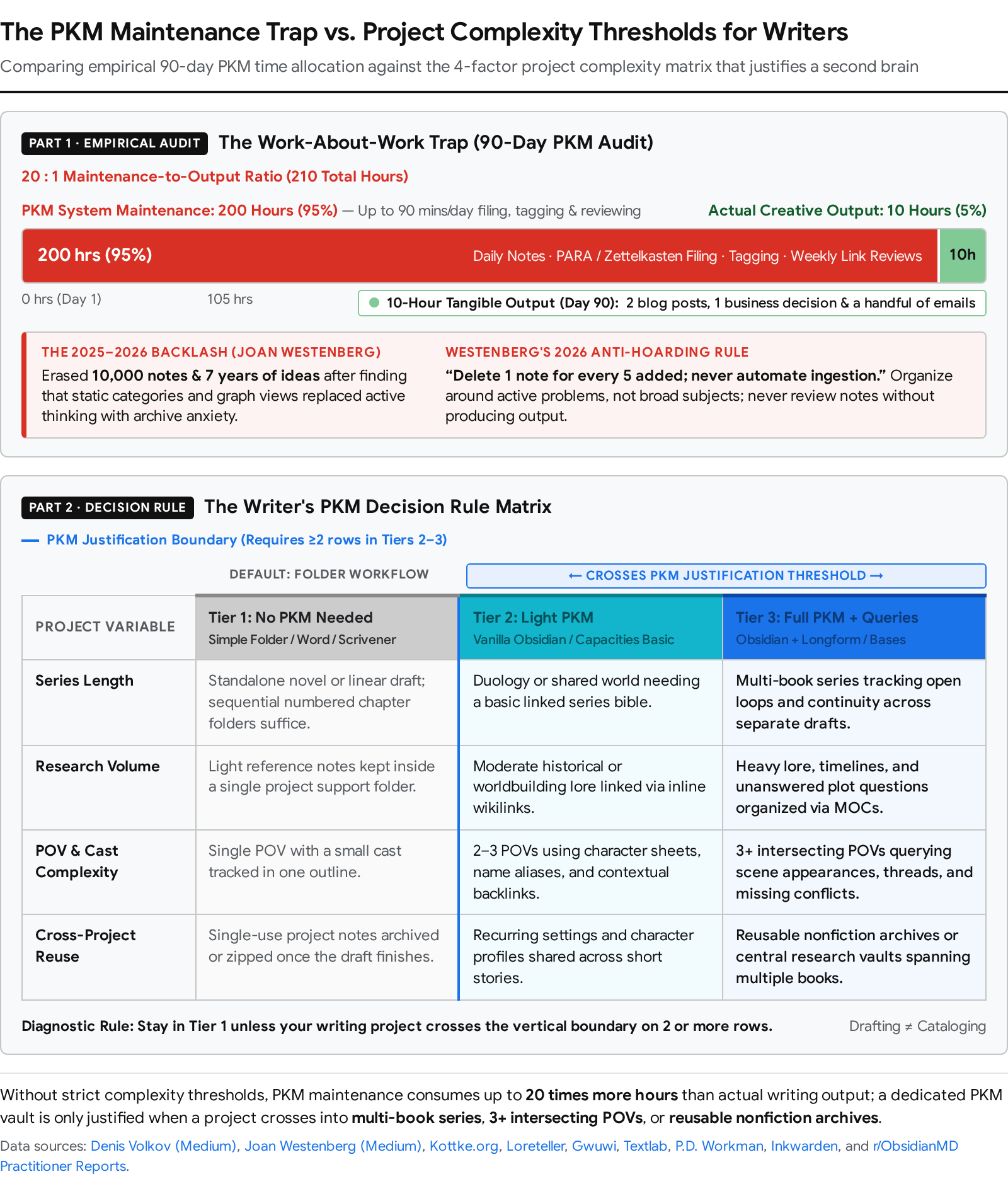
This aligns directly with the "performing productivity" and "work-about-work" critique detailed in Medium's "Are you building a second brain or just performing productivity?" ([68])[68] and Denis Volkov's December 17, 2025 essay "The Work-About-Work Trap: Why Your Productivity System Is Making You Less Productive" ([66])[66]. Because digital tools remove friction from capturing, tagging, and linking, the organizing itself becomes the work, turning writers into system administrators of digital museums[66]. Volkov audited three months of his own Obsidian + GTD + PARA + Zettelkasten system: he spent up to 90 minutes a day (~200 hours over three months) processing inputs, updating tags, and reviewing links, which produced an actual real-world output of just 2 blog posts, 1 business decision, and a handful of emails (~10 hours of tangible output)—a 20:1 ratio of maintenance theater to real creation[66]. Even his pulsing Obsidian graph view proved to be structural noise: Daily Note → [[Dog]] → [[Mum]] → [[Quantum Decision-Making]][66].
Finally, empirical observation of writing communities explains why writers with colour-coded systems often publish less than writers with a plain notes folder and a bias toward action ([65], July 12, 2026; [52], April 13, 2026)[52]. Saving and categorizing notes exercises a low-effort reactive mental muscle and triggers Christian Tietze's Collector's Fallacy ([94]), tricking the brain into feeling a dopamine hit of task completion when zero sentences have been drafted[65]. Wiki-style worldbuilding tools and colour-coded Notion databases reward completionism—pulling novelists into filling out every minor character template and mapping every city district until worldbuilding displaces the novel itself[6]. By contrast, writers who use numbered chapter files (01, 02) in a simple folder with zero YAML or linking overhead push straight through the discomfort of Anne Lamott's "shitty first draft" and finish their manuscripts ([77] and [65], July 12, 2026)[65].
The Decision Rule: What Threshold of Complexity Actually Justifies a PKM Tool?
Adopt a PKM tool only when your active writing project crosses at least two of the four complexity thresholds below ([7], October 4, 2026; [42]; [8])[7]:
| Complexity Dimension | Tier 1: No PKM Needed (Use Folders + Word / Scrivener / Ulysses) | Tier 2: Light PKM Justified (Vanilla Obsidian or Capacities Basic) | Tier 3: Full Queryable PKM Justified (Obsidian + Longform + Bases/Dataview) |
|---|---|---|---|
| 1. Series Length & Continuity | Standalone novel, novella, short story collection, or memoir where all characters and settings retire after one book[44]. | Duology or trilogy sharing a single cast and timeline where you need quick lookup of character backstories and locations[6]. | 3+ book ongoing series or shared universe requiring #openloops tracking, cross-book timelines, and an auto-updating Series Bible[6]. |
| 2. Research Volume | <50 reference items (e.g., contemporary fiction, personal essays) that fit in a single project folder or browser bookmark bar[65]. | 50–300 reference items (e.g., single-subject thriller or historical novel) needing topic tags and side-by-side reference viewing[7]. | 300–2,000+ primary sources/PDFs (e.g., multi-year nonfiction book, hard sci-fi, or academic synthesis) requiring metadata queries[19]. |
| 3. Number of POVs & Threads | 1–2 POV characters with a linear chronological plot that you can hold in your biological working memory[13]. | 3–4 POV characters with 2–3 intersecting mystery threads or clue plants across acts[5]. | 5+ POV characters, nonlinear timelines, unreliable narrators, or complex faction secrets where tracking "who knows what when" breaks mental recall[5]. |
| 4. Multi-Project Reuse | Zero reuse: Research and lore are specific to one manuscript and discarded once published[65]. | Occasional reuse: Short stories and novels set in the same world or adjacent nonfiction beats[48]. | Compounding archive: You write across multiple books, newsletters, and essays that continuously mine the same multi-year domain archive[42]. |
Scroll sideways to see all columns →
The "Second Hobby" Risk: Preventing PKM Maintenance from Replacing Writing
Customizing a PKM vault and writing a manuscript are two distinct hobbies that compete for the same cognitive hours ([5], July 30, 2026; [6])[5]. If your project crosses the threshold where a PKM tool is justified, enforce Joan Westenberg's August 12, 2026 rules ([70])[70] and Denis Volkov's outcome-first workflow ([66], December 17, 2025)[66]:
- Never Automate Ingestion: Disable automated Readwise, Zapier RSS, and bulk web-clipper dumps into your writing vault; manually choose every note and only save it if you can spend 30 seconds writing one sentence in your own words explaining what it changes and where you will use it[65].
- Work Right-to-Left (Outcome-First): Never build worldbuilding encyclopedias "left-to-right" for hypothetical future scenes; start inside the active manuscript scene you are drafting today, create an empty [[Character]] or [[Location]] wikilink inline without breaking drafting flow, and fill in that lore note only after your daily word count is done[6].
- Organize Around Problems and Questions, Not Subjects: Replace static filing-cabinet topic folders ("Psychology", "Empire History") with active narrative questions, conflicts, or #openloops tags, and store seed notes (half-formed arguments with an explicit next-action prompt) separately from inert reference facts ([65], July 12, 2026)[42].
- Enforce a 5-to-1 Pruning Ratio and Output Requirement: Spend a fixed weekly window pruning stale notes—deleting or merging at least 1 note for every 5 added—and never conduct a vault review session without producing external manuscript prose[70].
3. Vault Structure and Linking for Fiction and Nonfiction
Verdict: A functional fiction vault requires strict separation between your mutable outline, your reference lore, and your manuscript scenes, paired with one-way outward linking from scenes to entities ([47] and [6])[6]. Never build deep nested folder trees for worldbuilding before drafting, and never link both directions manually—let automatic backlinks and frontmatter queries build your series bible while you write[6].
Folder Structures That Work for Fiction
Across practitioner vaults in 2026, four folder architectures handle fiction workflows without collapsing into maintenance traps:
| Vault Architecture & Source | Top-Level Folder Hierarchy | How It Operates in Practice | Best Match |
|---|---|---|---|
| 1. The Lore / Novel / Outline Split (Novelists Assistant plugin, [47])[47] | Lore/ (设定), Novel/ (正文), Outline/ (纲要)[47]. | One-click setup auto-points plugin settings to the 3 folders[47]. Outline/ holds synopses, timelines, and foreshadowing; Lore/ holds worldbuilding with note counts; Novel/ holds chapters and volumes with live word/chapter stats[47]. | Web novelists and serialized fiction authors who want dedicated sidebar tabs for Lore and Outline previews[47]. |
| 2. Loreteller Modular Six-Folder Setup ([6])[6] | Manuscript/, Characters/, Worldbuilding/ (Locations/, Magic/, Factions/, History/), Plot/ (Outline/, Timeline/), Research/, Templates/[6]. | Every scene is a separate file sitting flat inside Manuscript/ (managed by Longform), while Characters/ holds strictly one note per character so backlinks stay specific[6]. Plot/ is kept separate from Manuscript/ so evolving outlines do not overwrite prose[6]. | Solo novelists writing complex single-book or multi-book genre fiction (fantasy, mystery, thriller)[6]. |
| 3. P.D. Workman Series Pipeline ([42])[42] | Root Series Wiki/ and Templates/, plus a New Book Template/ folder per novel containing: archived/, backup/, Drafts/ (draft 1, draft 2), Editor or compiling notes/, graphics/, marketing metadata/, prep/, published/, Research and Notes/[42]. | Older draft folders inside Drafts/ are zipped/compressed so they cannot pollute search results or be edited by mistake[42]. marketing metadata/ (loglines, tropes, BISAC categories, blurbs) is drafted before Chapter 1 to lock in genre focus[42]. | High-output commercial indie authors publishing multi-book series via Longform, Pandoc, Word, and Vellum[42]. |
| 4. Konik / Glau "Degrees of Done-ness" (Vanessa Glau & Eleanor Konik, [79])[79] | seeds/, indices/, longform/, metatext/, in progress/, finished/, archive/[79]. | Organizes by completion stage rather than subject: raw ideas start in seeds/ (sorted by file size on a Dataview dashboard to surface the most developed concepts), novel hubs sit in indices/, prose drafts live in longform/, and lore/plot notes sit in metatext/[79]. | Authors writing a mix of short stories, essays, and novels in the same universe[48]. |
Scroll sideways to see all columns →
Chapter-Per-File vs. Scene-Per-File
Choosing the right file granularity inside your manuscript folder determines how easily you can restructure your book during revision ([77] and [44])[6]:
| Granularity Model | How It Works | Structural Advantages | Friction Points & Best Match |
|---|---|---|---|
| Scene-Per-File (Recommended for Plotters & Multi-POV) | Every individual scene is a separate .md note inside Manuscript/ (or grouped in chapter folders), managed and compiled by Longform, Storyline, or Novelr[6]. | Drag-and-drop scene reordering across acts without copy-pasting; granular per-scene YAML metadata (pov, location, conflict, status); backlinks on a character sheet point to the exact scene where they appear rather than a 6,000-word chapter[6]. | Creates 50–100+ files per novel; requires a compilation plugin (Longform, Novelr, or Pandoc) or a master transclusion note (![[01 Scene]]) to read or export the full book[42]. |
| Chapter-Per-File (Recommended for Linear Drafters) | Every chapter is a single .md note numbered sequentially (01 Arrival.md, 02 Departure.md, using 01-01 for insertions)[77]. | Zero plugin dependency—alphabetical file sorting keeps the manuscript in order natively; natural reading flow across multi-scene chapters; easy 1-to-1 export to Word or Vellum[77]. | Moving a scene from Chapter 4 to Chapter 12 requires manual cut-and-paste; YAML frontmatter cannot easily track multiple POV shifts inside a single chapter[6]. |
| Single-Note Manuscript (For Discovery / Fast First Drafts) | The entire rough draft (or act of 20,000–30,000 words) is written in one file using # Chapter and ## Scene headers[44]. | Maximum drafting flow with zero file-switching friction; supported by Longform's "Single Scene Project" mode and Escrita for short stories and fast discovery drafts[44]. | Backlinks lose all granularity (every character link points to the same massive file); high risk of scrolling lag and accidental deletion[6]. |
Scroll sideways to see all columns →
What Linking Actually Buys You (And When It Is Decoration)
Understanding which linking mechanics solve real revision problems and which are visual vanity prevents wasted hours. Contextual Backlinks and Unlinked Mentions deliver the highest return for writers and represent the primary reason novelists migrate from Notion or Scrivener to Obsidian ([6] and [7], October 4, 2026)[6]. When you open [[Veya]]'s character sheet in Obsidian, the Backlinks panel displays the exact paragraph context from Chapters 2, 3, and 5 where she appears, while Unlinked Mentions catch every scene where you typed "Veya" without brackets—letting you verify her eye color, dialogue habits, or injury progression across 90,000 words without opening individual chapters[6].
By contrast, Graph View is 90% decoration and 10% diagnostic ([77] and [66], December 17, 2025)[66]. Adding "Previous Chapter / Next Chapter" links at the bottom of notes just to make the graph look like a chain is pure visual overhead that numbering filenames (01, 02) already solves[77]. Graph View only helps when filtered diagnostically—such as isolating Manuscript/ and Characters/ nodes to spot "orphan" characters who were created during worldbuilding but never linked to a single scene, or identifying disconnected topic clusters in a 2,000-note nonfiction literature review ([19])[19]. Similarly, Block References and Transclusion (((block-id)) in Logseq/Roam or ![[01 Arrival]] in Obsidian) are highly effective for remixing atomic quotes into nonfiction essay outlines or embedding chapters into a single read-through note, but fragile and cluttered for paragraph-by-paragraph fiction drafting ([82])[14].
To keep backlinks clean and functional across a full novel, follow these four practitioner rules ([6] and [79])[6]:
- One Note Per Entity: Give every named character, location, or faction its own individual note (Elena.md, Varenhold.md) rather than a combined list file so backlink panels stay specific to that entity[6].
- Link on First Mention Per Scene Only: Wrap [[Elena]] in double brackets only the first time she appears in Scene 07.md; linking her name 30 times in one scene clutters the prose and floods the backlinks panel with duplicate hits from the same file (alternatively, use Novelists Assistant to wrap or unwrap all lore links in one click)[6].
- Use YAML Aliases for Name Variants: Define aliases: [Elena Vareth, El] in the character's YAML frontmatter so typing either variant inside brackets links cleanly to the master note[6].
- Link Outward from Scenes to Lore—Never Backward: Always insert links inside your manuscript scene notes pointing outward to character, location, and plot notes; let the Outgoing Links panel on the scene note give you 1-click reference access while the automatic Backlinks panel on the character note handles reverse tracking[6].
The One-Vault vs. Multiple-Vault Question: Separating PKM from Creative Writing
Writers adopting Obsidian face a recurring architectural debate ([83], April 2024; [78]; [84])[78]: keep a single master vault for personal notes, work, and fiction ("One Vault to Rule Them All"), or isolate creative writing into separate vaults?
Separate vaults per series or universe are the standard choice for commercial genre novelists like P.D. Workman ([42]) and tabletop/fantasy worldbuilders[42]. Keeping a dedicated fiction vault prevents search and [[ autocomplete pollution (so typing a character's name does not surface your work meeting notes, tax records, or characters from a different fantasy world), keeps the vault lightweight by installing novel-specific plugins (Longform, Novel Word Count, Simple Indent) only where needed, and allows economical syncing when using Obsidian Sync Standard's 1-vault limit ($4/month annual at [89], checked October 8, 2026) alongside Dropbox or iCloud for archived worlds[1]. Conversely, a single unified vault works better for nonfiction authors, essayists, and historical/hard sci-fi novelists whose fiction continuously draws from real-world reading highlights, academic notes, and daily journals ([83] and [78])[78]. Because Obsidian cannot natively resolve wikilinks or Dataview queries across separate vaults, splitting a research-heavy workflow forces you to duplicate notes, plugins, themes, and hotkeys across multiple windows[78]. Writers who choose a single vault can eliminate visual clutter during drafting by installing the Folder Focus Mode or Workspaces Plus community plugin to hide their personal PKM directories while in "creative writing mode"[83].
Templates: Character Sheets, Location Sheets, and Scene Cards
Elaborate 50-field worldbuilding questionnaires kill novels by rewarding wiki completionism over scene mechanics ([52], April 13, 2026)[52]. Using Obsidian's Templater plugin (which automates variables, date insertion, tp.system.prompt user prompts, tp.file.rename, and tp.file.cursor placement) or Capacities' object properties, automate only the YAML metadata that feeds your Series Bible queries and the psychological prompts that drive scene conflict ([6])[6]:
| Template Type | What to Automate (YAML Frontmatter & Core Headers) | What That Automation Buys You | What to Leave Manual (Or Omit Entirely) |
|---|---|---|---|
| Scene Card Template (Manuscript/Scene 07.md)[6] | YAML Frontmatter: type: scene, pov: "[[Elena]]", chapter: 7, act: 2, status: draft, conflict: Elena discovers the Binding Oath has a loophole, summary: , wordcount: [6]. | Takes 15 seconds to fill in; allows Dataview or Obsidian Bases to automatically generate a live Series Bible dashboard showing all scenes from Elena's POV, revision status counts, or scenes missing a defined conflict[6]. | Leave manual: The prose body itself, inline editing markers (999 or [ ]), and links to previous/next chapters (file numbering 01, 02 or Longform handles sequence automatically)[42]. |
| Character Sheet Template (Characters/Elena.md)[6] | YAML Frontmatter: type: character, role: , age: , first-appearance: , status: alive, aliases: [Elena Vareth, El][6]. Body Headers: ## Appearance, ## Personality, ## Wound (what happened to them; what lie it installed), ## Want vs Need, ## Relationships (- [[]]), ## Arc *(where they start, where they end, what it costs)*[6]. | Focuses character prep on psychological drivers (Wound, Want vs Need) that dictate how a character reacts under pressure in a scene, while Dataview queries can filter all alive or antagonist characters[6]. | Leave manual/omit: Exhaustive trivia lists (astrological signs, childhood pets, favorite foods) and manual lists of scene appearances (let the automatic Backlinks panel populate appearances as you write)[6]. |
| Location Sheet Template (Worldbuilding/Locations/Varenhold.md)[6] | YAML Frontmatter: type: location, region: , faction: , aliases: [][6]. Body Headers: ## Sensory Details & Atmosphere, ## Political / Narrative Control, ## Key History & Events[6]. | Gives immediate sensory and political reminders in the right split pane when a scene enters that setting, while tracking every scene set there via backlinks[6]. | Leave manual/omit: Full city district directories, minor shopkeeper registries, or unvisited map regions until a drafted scene actually requires them[7]. |
Scroll sideways to see all columns →
4. What Each Tool Is Actually For: Category Differences and Failure Modes
Verdict: Note-taking is not drafting—most PKM tools are architectures for storing and querying fragments, not environments for writing 80,000 words of continuous prose, and the tools that pretend to do both without specialized compilation pipelines are worse at both jobs ([90], March 2026; [6]; [52], April 13, 2026)[4]. Before adopting a tool, match its underlying software category to the exact stage of the writing workflow you need to solve:
| Tool | True Software Category | Primary Job in a Writer's Workflow | Can You Draft a Full Book Manuscript Inside It? | Primary Abandonment Pattern (The Writer Who Quits) |
|---|---|---|---|---|
| Obsidian | Local Plain-Text Markdown Graph & Extensible IDE[3]. | Unified story bible, contextual continuity tracker, and scene-by-scene manuscript compiler (via Longform)[6]. | Yes—if you use Longform, Storyline, Novelr, or Escrita and export via Pandoc to Word/Vellum[42]. | Quits during week 3 after building a 20-plugin dashboard without drafting a single chapter[6]. |
| Notion | Cloud Relational Database & Multiplayer Operations Hub[2]. | Editorial calendars, marketing launch checklists, co-author wikis, and tag-filtered scene matrices[2]. | Poorly—editor lag on long pages, flat backlinks without context, and cloud lock-in force serious novelists out[7]. | Quits mid-draft when their 40,000-word workspace starts lagging and backlinks fail to show context[7]. |
| Logseq | Open-Source Local Block Outliner & Daily Journal[2]. | Frictionless daily idea capture, academic PDF annotation, and block-level query outlining[4]. | No—every paragraph is a bullet point; fighting the outliner to write narrative chapters is exhausting[4]. | Quits when transitioning from bulleted research capture to continuous multi-page prose drafting[4]. |
| Roam Research | Cloud Block Outliner & Transclusion Graph[3]. | Nonfiction synthesis and remixing atomic quotes/premises across a multi-pane sidebar[16]. | No—built for atomic block outlining and synthesis, not linear manuscript formatting or offline drafting[16]. | Quits at the end of the 31-day trial upon realizing Logseq and Obsidian offer local graphs for $0[16]. |
| Craft | Apple-First Visual Document & Card Publisher[28]. | Client-ready pitches, visual story lookbooks, polished essays, and 1-click web/PDF sharing[24]. | Short-form only—great for essays, but lacks manuscript compilation, unlinked mentions, and local Markdown storage[27]. | Quits after hitting the 1,500-block free wall or discovering their styled cards are stored in AWS JSON[25]. |
| Capacities | Cloud-Synced Typed Object Database[2]. | Structured research repositories and worldbuilding encyclopedias (Person, Book, Location objects)[2]. | No (Short-form/Pages only)—excellent side-by-side resource panel, but lacks a multi-scene novel compiler[36]. | Quits after over-engineering rigid object schemas that break when the plot changes mid-draft[18]. |
| Mem | Metered AI Capture & Conversational Recall Agent[37]. | Hands-free voice memo transcription, email/meeting ingestion, and AI-synthesized topic briefs[37]. | No—strictly a capture and AI chat tool; metered note caps (25 free, 100 on $29/mo Pro) punish active writers[37]. | Quits within days after hitting the 25-note monthly free cap or balking at $29–$99/mo metered tiers[37]. |
Scroll sideways to see all columns →
Obsidian — Local Markdown, Plugin Ecosystem, and Long-Form Writing (The Default for Solo Novelists)
Verdict: Obsidian ($0 core app; Sync Standard $4/month annual at [1], checked October 8, 2026) is the only linked-note environment that genuinely scales to drafting and compiling a full novel, provided you restrain plugin bloat[1]. Because Obsidian edits full Markdown documents rather than forcing every paragraph into a database row or outliner bullet, writers can pair its contextual backlinks with specialized community plugins—Longform, Storyline, Novelr, Escrita, or Novel-kit—to manage scene sequences, track daily word-count targets, and compile chapters through Pandoc into Word (.docx) and Vellum ([42] and [45])[2]. Even among dedicated Obsidian users, many novelists use Obsidian strictly as their research and story-bible scrapbook while typing final prose in Scrivener or Ulysses ([43] and [48])[43]. Failure Mode (Who Buys It and Abandons It): The "Architect Procrastinator"—a writer who installs 25 plugins, spends three weeks debugging Dataview JavaScript queries and custom CSS themes to build an elaborate empty wiki, never writes Scene 1, and abandons the vault for a plain word processor ([6] and [5], July 30, 2026)[4].
Notion — Relational Databases, Editorial Calendars, and Collaboration (Better for the Business Side Than the Manuscript)
Verdict: Notion ($0 solo free tier; Plus $10/member/month annual; Business with full AI $20/member/month annual at [9], checked November 13, 2026) belongs in a writer's business and planning stack, not as the primary manuscript editor[2]. Its relational databases and filtered tag views are exceptional for managing editorial calendars, tracking literary agent queries, coordinating co-authors or ARC teams with granular permissions, and mapping high-level scene beats ([13], March 15, 2026)[2]. However, when used as a novel processor, Notion's cloud block architecture introduces typing lag on long drafts, lacks true local file ownership, and offers only shallow title-only backlinks ([7], October 4, 2026)[7]. Failure Mode (Who Buys It and Abandons It): The "Aesthetic Dashboard Builder"—a writer who spends days designing a visually stunning Notion "Author OS" database from scratch, starts drafting chapters inside database pages, hits mobile/desktop lag and flat backlinks once the plot grows complex, and migrates to Obsidian or Scrivener ([87] and [52], April 13, 2026)[7].
Logseq — Block-Based Outliner and Daily Notes (Better for Capture Than Drafting)
Verdict: Logseq ($0 open-source; optional Backer Sync $5/month at [14], checked October 29, 2026) is built for rapid daily thought capture, task querying, and academic PDF annotation—not narrative prose drafting[4]. Because Logseq opens directly to today's Daily Journal and treats every bullet point as an addressable block, it removes the friction of deciding where to file a fleeting quote or research note ([90], March 2026)[4]. Yet that same outliner design fights continuous prose: every paragraph is forced into a bullet node, large vaults (8,000–10,000+ notes) run slower than in Obsidian, and the 2026 transition between Logseq OG (Markdown) and Logseq 2.0 DB (SQLite beta) creates sync and mobile uncertainty ([20] and [2], 2026)[2]. Failure Mode (Who Buys It and Abandons It): The "Prose Outliner"—a writer who loves capturing daily research bullets in Logseq, attempts to write 4,000-word novel chapters inside the bulleted tree, experiences iOS/Android sync glitches or frustration with outliner formatting, and switches to Obsidian ([82])[4].
Roam Research — The Original Networked-Thought Tool (Premium Price, No Free Tier)
Verdict: Roam Research ($15/month or $165/year Pro; $500/5-year Believer; no free tier beyond a 31-day trial at [21], checked October 8, 2026) remains a powerful block-transclusion environment for nonfiction synthesis, but its high price and cloud lock-in make it hard to recommend over free local competitors[3]. Roam's shift-click sidebar and inline block embeds let essayists remix atomic notes from across a graph with minimal friction ([22])[16]. However, like Logseq, it is a bulleted outliner unsuitable for manuscript drafting, its feature velocity has slowed noticeably, and its mobile experience lags ([16], October 2026)[16]. Failure Mode (Who Buys It and Abandons It): The "Networked Thought Tourist"—a writer who signs up for the 31-day trial hoping bidirectional links will magically generate book chapters, accumulates an unstructured pile of daily bullets, balks at the $15/month paywall when Obsidian and Logseq are free, and exports their graph[16].
Craft — Polished Documents and Apple-First Design (Better for Output Than Networked Notes)
Verdict: Craft ($0 Starter capped at 1,500 blocks; Plus $10/month or $96/year standard, $4.80/month web promo at [24] and [25], checked November 12, 2026) is a visual document studio for writers whose documents need to look client-ready on Mac, iPad, or iPhone, rather than a deep PKM graph[24]. It excels at formatting essays, nesting sub-pages as visual cards, and publishing pitches or story Bibles via secret web links or PDF[24]. Conversely, it lacks unlinked mention detection, Dataview-style metadata queries, and native flat-file Markdown storage (storing data as JSON on AWS unless restricted to non-collaborative External Locations) ([28])[27]. Failure Mode (Who Buys It and Abandons It): The "Visual Card Hoarder"—a novelist who builds aesthetically styled character and setting cards on the Free plan, hits the 1,500-block ceiling after two chapters, discovers that bulk exporting strips away all card layouts and page styling, and leaves ([27] and [28])[25].
Capacities — Object-Based and AI-Assisted (Better for Research Than Drafting)
Verdict: Capacities ($0 Basic with unlimited objects and free cloud sync; Pro $9.99/month annual or $11.99/month monthly at [33], checked October 23, 2026) is the premier choice for writers who want structured database objects (Book, Person, Location) without building Notion tables or maintaining Obsidian plugins[2]. Its multi-category tagging and Shift-click right side panel make reviewing research web clips and outlines beside an active draft page effortless ([36])[36]. However, Capacities is not a novel-drafting studio: it has no scene binder or compilation pipeline to stitch 60 Page objects into a single formatted manuscript[36]. Failure Mode (Who Buys It and Abandons It): The "Taxonomy Perfectionist"—a writer who spends weeks defining custom Object Types and rigid property schemas up front, discovers mid-draft that their evolving story doesn't fit those categories, and abandons the workspace ([18] and [52], April 13, 2026)[18].
Mem — AI-First Capture (Better for Ideation Than Organisation)
Verdict: Mem ($0 Free capped at 25 new notes/month; Plus $9/month for 50 notes/month; Pro $29/month for 100 notes/month at [37], checked November 2026) is an AI capture and synthesis assistant for voice memos, emails, and interview notes—not an organizational vault or book-writing tool[37]. By eliminating folders and relying on Collections, automatic contextual links, the real-time Heads Up panel, and Mem Chat, it saves busy columnists and executives from manual filing ([39], February 10, 2026; [41])[39]. However, its lack of manual hierarchy and its strict monthly note caps make structured worldbuilding or scene-by-scene drafting impossible[37]. Failure Mode (Who Buys It and Abandons It): The "AI-Hype Drafter"—a writer who dumps a burst of story notes into Mem expecting an effortless AI second brain, hits the 25-note monthly free limit within days, sees that even the $29/month Pro plan caps creation at 100 new notes/month (with no Android app), and cancels ([37], checked November 2026; [39])[37].
5. Exact Writer Search Queries Answered (Quick-Reference Cluster)
"Do I need a second brain to write a novel"
Verdict: No—most novelists do not need a second brain, and building one for a standalone novel frequently delays finishing the manuscript ([65], July 12, 2026; [52], April 13, 2026)[52]. If you are writing a single novel with 1–2 POV characters and light research, a numbered folder of chapter files in Word, Google Docs, or Scrivener ($59.99 one-time desktop license at [8]) is faster and avoids the PKM maintenance trap[8]. As Joan Westenberg documented when deleting 10,000 notes and 7 years of ideas ([92], June 16, 2025)[67], externalizing every thought often replaces actual reflection with "performing productivity"[66]. A PKM tool like Obsidian ($0 at [1], checked October 8, 2026) is only justified when your project crosses into a 3+ book series, 3+ intersecting POVs/timelines, or hundreds of reusable research notes[1].
"Obsidian vs Notion for writers"
Verdict: Use Obsidian for novel drafting, worldbuilding, and continuity tracking; use Notion for editorial calendars, marketing operations, and team collaboration ([2] and [7], October 4, 2026)[2]. Obsidian ($0 core app; optional Sync Standard $4/month annual or $5/month monthly at [1], checked October 8, 2026) keeps plain Markdown files locally on your device, runs offline without lag across 10,000+ notes, and displays contextual paragraph backlinks plus unlinked mentions[1]. Notion ($0 Free solo plan with a 5 MB file upload cap; Plus $10/member/month annual or $12/month monthly; Business with full Notion AI $20/member/month annual or $24/month monthly at [9], checked November 13, 2026) provides superior visual relational databases out of the box, but stores your work on cloud servers, suffers from editor lag on long drafts, and only shows flat page titles in backlinks[2].
"Best note-taking app for novelists"
Verdict: Obsidian ($0 at [1], checked October 8, 2026) is the best note-taking and story-bible app for solo novelists who want local files and contextual backlinks, while Capacities ($0 Basic tier at [33], checked October 23, 2026) is the best zero-setup alternative for writers who want typed object cards with free cloud sync[1]. In Obsidian, wrapping [[Character]] or [[Location]] in brackets inside a scene automatically builds a contextual Series Bible via backlinks and frontmatter queries, while the Longform community plugin compiles scene files into a complete manuscript ([6])[6]. Novelists should avoid block-only outliners like Logseq ($0 at [14], checked October 29, 2026) and Roam ($15/month at [21], checked October 8, 2026) because bullet-per-paragraph formatting fights narrative prose, and avoid Mem ($0 Free capped at 25 notes/month; $29/month Pro capped at 100 notes/month at [37], checked November 2026) due to strict note-creation caps[3].
"Obsidian vault structure for fiction"
Verdict: Structure your fiction vault around a clean modular hierarchy—either the 6-folder Loreteller layout (Manuscript/, Characters/, Worldbuilding/, Plot/, Research/, Templates/) or the 3-folder Lore / Novel / Outline split—with one file per scene in Manuscript/ and one file per entity in Characters/ ([6] and [47])[6]. Keep Plot/Outline separate from Manuscript/ so evolving outlines do not overwrite prose[6]. Assign 5–6 fast YAML frontmatter properties (type, pov, chapter, act, status, conflict) via Templater, link outward from scene files to character/lore notes only on the first mention per scene, and use the Longform plugin to reorder scenes and compile your draft ([6] and [42])[6].
"Logseq vs Obsidian for creative writing"
Verdict: Choose Obsidian ($0 at [1], checked October 8, 2026) for creative writing, fiction drafting, and worldbuilding; choose Logseq ($0 open-source at [14], checked October 29, 2026) only if you want a bulleted daily journal or academic PDF annotator ([20] and [90], March 2026)[1]. Logseq is a strict block outliner where every paragraph is an indented bullet point, making continuous narrative prose feel constrained[4]. In addition, Logseq in 2026 is split between its maintenance-mode Markdown app ("Logseq OG" v0.10.15) and its beta SQLite database rewrite ("Logseq 2.0 DB" v2.0.2), with slower performance on 10,000+ note vaults and less mature mobile apps than Obsidian ([2] and [16], October 2026)[2].
"Second brain backlash"
Verdict: The 2025–2026 second brain backlash is a widespread critique by writers and technologists showing that obsessive digital note-taking often replaces real thinking with archival anxiety and "performing productivity" ([67], July 8, 2025; [68]; [66], December 17, 2025)[66]. Sparked by Joan Westenberg erasing 10,000 notes and 7 years of ideas ([92], June 16, 2025)[67], Denis Volkov's audit showing 200 hours of PKM maintenance yielding only 10 hours of real output[66], and Lawrence Dauchy's Building Your First Brain ([74], 2026)[74], the backlash exposes how the Collector's Fallacy tricks writers into hoarding unread clips for a "future self" who never arrives[65]. The antidote is Westenberg's August 12, 2026 ruleset ([70]): never automate ingestion, organize around active problems rather than subjects, keep dissenting notes, prune 1 note for every 5 added, and never review notes without producing output[70].
"Is Roam Research worth it"
Verdict: For nearly all writers in 2026, Roam Research is not worth $15/month or $165/year ($500 for 5 years on Believer; no free tier beyond a 31-day trial at [21], checked October 8, 2026) ([23] and [16], October 2026)[3]. Although Roam pioneered bidirectional links, daily notes, and block embeds, its core outliner and block-reference model is replicated for $0 by open-source, local-first Logseq ([14], checked October 29, 2026, which also adds built-in PDF annotation and flashcards)[16], while long-form writers get local Markdown ownership and novel-compilation plugins for $0 in Obsidian ([1], checked October 8, 2026)[1]. Roam is only worth the subscription for veteran users locked into shared multiplayer Roam graphs or its specific native query sidebar[16].
"PKM for writers"
Verdict: An effective PKM for writers must separate active "seed notes" and manuscript drafts from passive reference trivia, and match the software to your exact output format ([65], July 12, 2026)[65]. Solo novelists and long-form nonfiction writers who want local file control and manuscript compilation should use Obsidian ($0 core app; Sync from $4/month annual at [1], checked October 8, 2026)[1]. Writers who want structured object cards (Book, Person, Topic) with free multi-device cloud sync and zero plugin setup should use Capacities Basic ($0 forever; Pro at $9.99/month annual at [33], checked October 23, 2026)[2]. Apple-ecosystem writers who prioritize polished visual documents and client-facing web/PDF shares over deep graph queries should use Craft Plus ($0 Starter for 1,500 blocks; Plus at $8/month annual or $10/month monthly at [25], checked November 12, 2026)[25].
"How to organise research for a novel"
Verdict: Organize novel research by active scene utility and narrative questions rather than encyclopedic subject folders, and never pause mid-scene to fall down a research rabbit hole ([42], [36], and [70], August 12, 2026)[36]. Follow these four sequential steps:
- Isolate Active Book Research: Store research notes in a dedicated Research/ subfolder inside the current novel's directory (in Obsidian, moving generalizable notes to a master archive only after the draft is finished) or tag them to the active book project (in Capacities)[6].
- Write an Actionable Job Title on Every Note: Never clip raw articles without context; spend 30 seconds writing a 1-sentence prompt at the top stating which scene, character, or conflict this fact serves ([65], July 12, 2026)[65].
- Drop Inline Placeholder Markers (999 or [ ]) While Drafting: When a missing historical or technical detail comes up mid-scene, type 999 verify travel time or a task checkbox [ ] directly in the prose and keep writing so you never break drafting momentum[7].
- Review Research in a Split Right Side Panel: Hold Shift and click your research tag or note to open it in a side-by-side right pane next to your manuscript scene, linking facts inline with [[ or @ only where needed[36].
"Best app for worldbuilding notes"
Verdict: Obsidian ($0 forever at [1], checked October 8, 2026) is the best app for worldbuilding notes that live directly beside your manuscript prose, while Capacities ($0 Basic tier at [33], checked October 23, 2026) is the best structured object-based alternative for writers who dislike plugins ([6] and [2])[1]. As analyzed in Inkwarden's April 13, 2026 study ([52]) and Reddit worldbuilding surveys ([49])[49], standalone wiki platforms like World Anvil and Kanka—or DIY Notion databases—fail novelists because they isolate world lore in a separate app away from the manuscript editor and encourage completionist cataloging of surface trivia instead of character psychology (Wound, Want vs Need)[6]. Keeping your worldbuilding inside Obsidian (or dedicated novel studios like NovelOS Studio, Campfire, or Inkwarden) ensures lore stays one click away from your active scene and updates in seconds when the plot shifts mid-draft ([5], July 30, 2026; [8])[5].
Sources and references
- Pricing - Obsidian, https://obsidian.md/pricing
- 8 Best Obsidian Alternatives in 2026 (It's Free — Why Switch), https://www.usecarly.com/blog/obsidian-alternatives/
- Best Knowledge Management Apps 2026: 9 Compared | dEssence, https://dessence.ai/blog/best-knowledge-management-app-2026
- Obsidian vs Logseq 2026: Which Is Best for Claude MCP?, https://www.gitsurfer.com/blog/obsidian-vs-logseq-in-2026-which-one-actually-works-best-with-claude
- Obsidian Alternatives Built for Novel Writing | NovelOS Blog, https://novelos.studio/blog/obsidian-alternatives-built-novel/
- Obsidian for Fiction Writers: Setup, Plugins, and Workflow | Loreteller, https://loreteller.com/learn/obsidian-fiction-writers-guide/
- Biosphere – Writing Log #5 – From Notion to Obsidian, https://gwuwi.com/2026/10/04/biosphere-writing-log-5-from-notion-to-obsidian/
- https://nownovel.com/novel-planning-software/
- Notion Pricing Plans: Free, Plus, Business, & Enterprise., https://www.notion.com/pricing
- Notion Pricing 2026: Free vs Plus vs Business (+ AI Cost Breakdown), https://get-alfred.ai/blog/notion-pricing
- Notion AI Pricing (Nov 2026): Plans, Credits, Team Cost - Sentra.app, https://www.sentra.app/articles/notion-ai-pricing
- notion becoming worse for writing - Reddit, https://www.reddit.com/r/Notion/comments/1oqkg4n/notion_becoming_worse_for_writing/
- https://gwuwi.com/2026/03/15/how-to-draft-a-novel-using-relational-notion-databases-as-an-obsidian-alternative/
- Logseq: A privacy-first, open-source knowledge base, https://logseq.com/
- Logseq (notes): features, plans and pricing - ToolGuide, https://toolguide.io/en/tool/logseq/
- Logseq vs Roam Research: which outliner in 2026? - Dexi, https://dexi.net/compare/roam-research-vs-logseq
- Logseq - Bellingcat's Online Investigation Toolkit - GitBook, https://bellingcat.gitbook.io/toolkit/more/all-tools/logseq
- Obsidian Alternative and Alternatives to Obsidian Compared, https://mentalclone.com/obsidian-alternative
- Logseq vs Obsidian: Which Personal Knowledge Tool Wins in 2026?, https://toolscout.app/logseq-vs-obsidian-comparison/
- Logseq vs Obsidian - Bundl, https://bundl.run/compare/logseq-vs-obsidian
- Roam Research – A note taking tool for networked thought., https://roamresearch.com/
- Roam Research Review: Networked Note-Taking App, https://www.primeproductiv4.com/apps-tools/roam-research-review
- Roam Research Review 2026: Pros, Cons, Pricing & Verdict, https://awesome.tools/apps/roam-research
- Craft Pricing Plans, https://www.craft.do/pricing
- Plans and Pricing - Craft Help Center - Craft Documentation, https://support.craft.do/en/account-and-subscription/subscription-plans/plans-and-pricing
- Usage & Limits - Craft Help Center - Craft Documentation, https://support.craft.do/en/ai-assistant/usage
- Is craft app local based ??? : r/CraftDocs - Reddit, https://www.reddit.com/r/CraftDocs/comments/1hcpy5m/is_craft_app_local_based/
- Craft Docs alternative: private, offline, open source - Koru, https://www.koru.do/en/alternatives/craft
- Craft Handbook: Quick Start Guide | PDF | I Cloud | Ios - Scribd, https://www.scribd.com/document/659007769/Craft-Handbook
- Our thoughts on Data Ownership and Accessibility - Craft Docs, https://www.craft.do/blog/your-data-is-yours
- A Beginner's Guide to Craft: Linking - The Sweet Setup, https://thesweetsetup.com/a-beginners-guide-to-craft-linking/
- Craft for Mac (2026) — Review & Install - Bundl, https://bundl.run/apps/craft
- Pricing - Capacities, https://capacities.io/pricing
- Capacities: features, pricing and experiences - ToolGuide, https://toolguide.io/en/tool/capacities/
- Capacities vs Standard Notes - askusers, https://askusers.org/compare/capacities-vs-standard-notes
- Capacities for writing, https://docs.capacities.io/tutorials/capacities-for-writing
- Mem Pricing - Mem.ai, https://get.mem.ai/pricing
- Mem Workspace | Notes, meetings, and ideas in one place, https://get.mem.ai/product/workspace
- What Is Mem AI? The AI Note-Taking App That Organizes for You, https://lovable.dev/guides/what-is-mem-ai
- Mem | Your AI chief of staff, https://get.mem.ai/
- How to Build Account Plans in Your Notes App - Mem.ai, https://get.mem.ai/guides/build-account-plans-notes
- https://pdworkman.com/write-book-with-obsidian/
- Writing a novel on Obsidian? : r/ObsidianMD - Reddit, https://www.reddit.com/r/ObsidianMD/comments/1tp77i3/writing_a_novel_on_obsidian/
- Writing Novels with Obsidian and Longform - Zenn, https://zenn.dev/misari/articles/331eb9995e2e8b?locale=en
- Novelr - Obsidian Plugin, https://community.obsidian.md/plugins/novelr
- Escrita - Obsidian Plugin, https://community.obsidian.md/plugins/escrita
- Novelists Assistant - Obsidian Plugin, https://community.obsidian.md/plugins/novelists-assistant
- If you would use Obsidian to write a novel, how would you organize it?, https://www.reddit.com/r/ObsidianMD/comments/19fiqe1/if_you_would_use_obsidian_to_write_a_novel_how/
- What kind of worldbuilding software do you use - Reddit, https://www.reddit.com/r/worldbuilding/comments/1xqbnu8/what_kind_of_worldbuilding_software_do_you_use/
- Notion pricing in October 2026: plans and costs | Dupple, https://dupple.com/pricing/notion
- Notion Pricing Explained (2026) | The Subscription Playbook, https://www.subscriptionplaybook.com/pricing-teardowns/notion/
- The Best Worldbuilding App for Novelists in 2026 (That Isn't Just a, https://inkwarden.app/blog/the-best-worldbuilding-app-for-novelists-in-2026-that-isnt-just-a-wiki
- Notion vs Obsidian vs Logseq: Which Wins in 2026? | A Versus B, https://www.aversusb.net/compare/notion-vs-obsidian-vs-logseq?source_page=logseq-vs-obsidian
- What are the strengths and the weaknesses of Logseq, Hypernotes, https://www.reddit.com/r/Zettelkasten/comments/10tizbs/what_are_the_strengths_and_the_weaknesses_of/
- Craft — Productivity App for Notes, Tasks, and Docs, https://www.craft.do/
- Check Storage Usage - Craft Help Center - Craft Documentation, https://support.craft.do/en/account-and-subscription/storage-and-recovery/storage-usage
- Evernote Alternatives in 2026: 9 Compared | dEssence, https://dessence.ai/blog/evernote-alternatives-2026
- Octarine vs Craft: an honest comparison, https://octarine.app/compare/craft
- Import Options, https://www.craft.do/getting-started/b/793922A4-0E22-4890-9341-5F2E710F1C74/Import-Options
- Subscriptions and payments - Capacities Docs, https://docs.capacities.io/reference/subscriptions
- Mem Agent | AI that keeps track and follows up, https://get.mem.ai/product/agent
- Mem pricing : r/ProductivityApps - Reddit, https://www.reddit.com/r/ProductivityApps/comments/1n6itxl/mem_pricing/
- Mem AI pricing: free, paid from €12.12/mo | ToolTrim, https://tooltrim.com/en/tool/mem-ai/pricing
- Books about Personal Knowledge Management and Zettelkasten, https://forum.zettelkasten.de/discussion/2824/books-about-personal-knowledge-management-and-zettelkasten
- Why Your Notes App Is Full and Your Drafts Folder Is Empty - Text Lab, https://textlab.info/why-your-notes-app-is-full-and-your-drafts-folder-is-empty
- The Work-About-Work Trap: Why Your Productivity System Is Making, https://medium.com/@paralloid/the-work-about-work-trap-why-your-productivity-system-is-making-you-less-productive-0dc11e7b462d
- I Deleted My Second Brain. Why I Erased 10,000 Notes, 7 Year, https://kottke.org/25/07/0047083-i-deleted-my-second-brain
- Are you building a second brain or just performing productivity?, https://medium.com/blog/are-you-building-a-second-brain-or-just-performing-productivity-6f521825d4cf
- How to Build a Second Brain for Reading: A Complete System, https://chapterly.ai/blog/second-brain-reading
- https://medium.com/westenberg/5-rules-for-a-second-brain-youll-actually-use-ede340dd19c5
- Cognitive Hygiene - And Now For That Latte, https://forum.literatureandlatte.com/t/cognitive-hygiene/149464
- I deleted my second brain | Hacker News, https://news.ycombinator.com/item?id=44402470
- Notion Fatigue: When Infinite Customization ... - Build First Brain, https://buildfirstbrain.com/journal/notion-fatigue-when-infinite-customization-paralyzes-the-mind/
- Build First Brain · Build your First Brain before your Second, https://buildfirstbrain.com/
- What Is a Second Brain? Definition, Methods and the AI Version, https://secondbrainmemory.com/blog/what-is-a-second-brain/
- Concerning note taking (short rant) : r/ObsidianMD - Reddit, https://www.reddit.com/r/ObsidianMD/comments/pv5abl/concerning_note_taking_short_rant/
- How do you actually write a novel in Obsidian? Every guide I've, https://www.reddit.com/r/ObsidianMD/comments/1xjnm5w/how_do_you_actually_write_a_novel_in_obsidian/
- Multiple or single vault? : r/ObsidianMD - Reddit, https://www.reddit.com/r/ObsidianMD/comments/1ct11tj/multiple_or_single_vault/
- How I Plan and Write Fiction in Obsidian | by Vanessa Glau | Medium, https://medium.com/@vanessaglau/how-i-plan-and-write-fiction-in-obsidian-f140455281c1
- Obsidian from Scrivener : r/ObsidianMD - Reddit, https://www.reddit.com/r/ObsidianMD/comments/1jnfzu1/obsidian_from_scrivener/
- Novel-kit - Obsidian Plugin, https://community.obsidian.md/plugins/novel-kit
- I tried to leave Logseq for Obsidian. Here's my soapbox. - Reddit, https://www.reddit.com/r/logseq/comments/1wwub6a/i_tried_to_leave_logseq_for_obsidian_heres_my/
- Multiple Vaults: Separate PKM from Creative Writing?, https://forum.obsidian.md/t/multiple-vaults-separate-pkm-from-creative-writing/79628
- Do you use multiple vaults? : r/ObsidianMD - Reddit, https://www.reddit.com/r/ObsidianMD/comments/1cdwvia/do_you_use_multiple_vaults/
- Who uses multiple vaults vs just one? : r/ObsidianMD - Reddit, https://www.reddit.com/r/ObsidianMD/comments/zpnq4x/who_uses_multiple_vaults_vs_just_one/
- Template recommendations for writers at Obsidian? - Reddit, https://www.reddit.com/r/ObsidianMD/comments/1iovay2/template_recommendations_for_writers_at_obsidian/
- Why Users Abandon Notion: Complexity, Limitations, and the Rise of, https://medium.com/@ruslansmelniks/why-users-abandon-notion-complexity-limitations-and-the-rise-of-ai-alternatives-cba91a95b535
- Roam Research - Bi-directional Linked Notes - Wiki | clawbot, https://clawbot.ai/wiki/productivity/roam-research-bi-directional-linked-notes.html
- obsidian.md
- www.gitsurfer.com
- www.aversusb.net
- www.joanwestenberg.com
- www.joanwestenberg.com
- zettelkasten.de
Generated by Gemini Deep Research


